
Download BatteryBar – battery monitor, laptop battery, battery life tracker, power management, battery health
Overview
BatteryBar is a lightweight, purpose-built utility designed to enhance user awareness of laptop battery status and performance. Developed by Jason K. Menard, the application serves as a real-time monitoring tool for Windows users who want immediate access to critical battery metrics without relying on default system indicators. The app addresses the common frustration of unexpected shutdowns by providing clear, precise information about battery capacity, remaining charge, and estimated time until depletion. Its primary function is to deliver actionable insights into battery health and usage patterns, enabling users to make informed decisions about device usage and power management. Target users include professionals, students, and remote workers who depend on their laptops during travel or in environments without consistent access to power outlets. The app’s minimal footprint and seamless integration with Windows make it ideal for users seeking a no-frills, efficient solution. BatteryBar operates as a dedicated power management tool within the Windows ecosystem, filling a niche for users who want more granular visibility than standard OS notifications provide. Despite its simplicity, the application plays a meaningful role in improving user productivity and device longevity by promoting proactive battery usage habits.Key Features & Functionality
BatteryBar delivers a focused set of features tailored to battery monitoring and performance tracking. The app provides detailed battery information, including current charge percentage, battery capacity, AC power supply status, and real-time battery drain rate. This data allows users to assess both the current state and long-term health of their laptop’s battery. For instance, a sudden increase in drain rate may indicate a hardware or software issue, prompting users to investigate further. Real-time battery monitoring is implemented through a dynamic progress bar that updates continuously as the laptop is used. This visual indicator ensures users never lose track of remaining battery life, especially during critical tasks like presentations or remote meetings. The time remaining display complements this feature by converting charge levels into estimated usage time, helping users plan their workflow more effectively—such as deciding whether to continue working or seek a power source. The app integrates directly with Windows without requiring additional drivers or system modifications. This seamless compatibility ensures it runs reliably across supported versions of the operating system. The user-friendly interface presents all data in a clean, uncluttered layout, allowing users to quickly interpret battery status at a glance. These features collectively empower users to manage their device’s power more efficiently and reduce the risk of unexpected shutdowns.- Detailed battery information including capacity, percentage, and drain rate
- Real-time battery life bar for continuous monitoring
- Time remaining estimation based on current usage patterns
- Seamless integration with recent Windows operating systems
- Simple, intuitive interface for users of all technical levels
Interface, UX & Performance
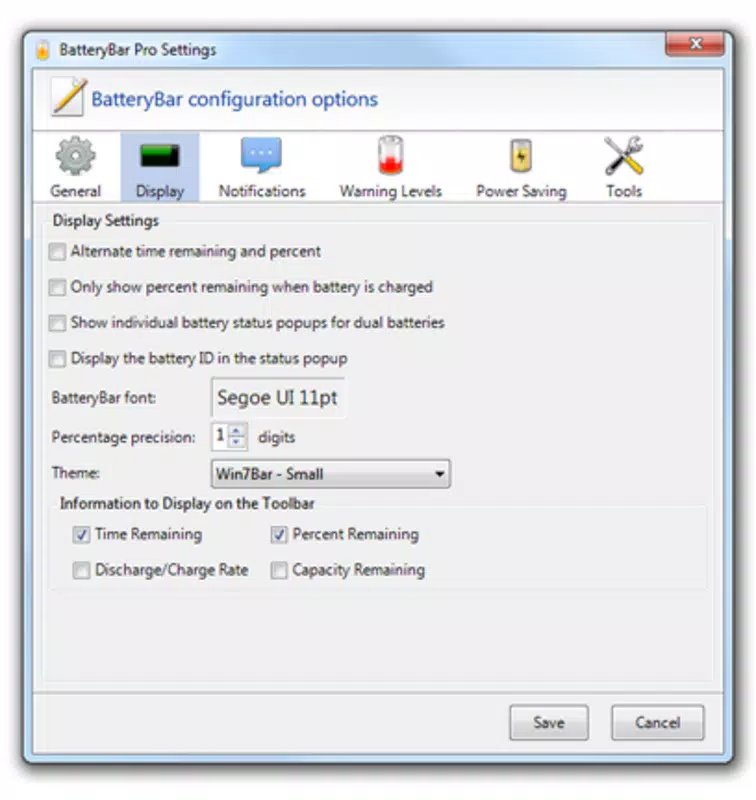
BatteryBar features a minimalistic interface designed for clarity and immediate readability. The app displays battery metrics in a compact, non-intrusive format that blends well with the Windows desktop environment. Users can access key data with a single glance, reducing cognitive load and improving usability during high-focus tasks. Navigation is straightforward—there are no complex menus or settings required, making it accessible even to users with limited technical experience. The visual design emphasizes functionality over aesthetics, using clear typography and color-coded indicators to convey battery status (e.g., green for healthy, red for low). This approach enhances legibility across different screen types and brightness levels. The app maintains a consistent response time and does not introduce noticeable lag or system overhead, which is critical for a background utility. Although the developer did not list formal performance metrics, the app’s file size of 1.2 MB suggests it is optimized for efficiency. It runs in the system tray, consuming minimal memory and CPU resources. Stability appears to be a priority, as the app functions reliably during extended use. Responsiveness is maintained across various device categories, from lightweight laptops to high-performance workstations. The app remains active and accurate even during intensive tasks, ensuring continuous monitoring without interruptions.Platform Compatibility & Technical Requirements
BatteryBar is designed exclusively for the Windows platform and is compatible with recent versions of the operating system. The application has a file size of 1.2 MB, indicating a lightweight footprint suitable for devices with limited storage. The software version is 1.0.0, and it is currently available at no cost to users. The developer did not specify minimum OS requirements or detailed technical specifications. Compatibility information was not fully disclosed, so users should verify system readiness before installation. While the app is designed to work seamlessly with Windows, exact version support (e.g., Windows 10, 11) remains unspecified. The absence of detailed system requirements means users should proceed with caution on older or non-standard configurations.Pros and Cons
- Lightweight design with minimal system resource usage
- Real-time battery monitoring with visual progress bar
- Clear time remaining estimation for better planning
- Simple, intuitive interface suitable for all users
- Free to download and use with no in-app purchases
- Developer did not provide detailed OS compatibility information
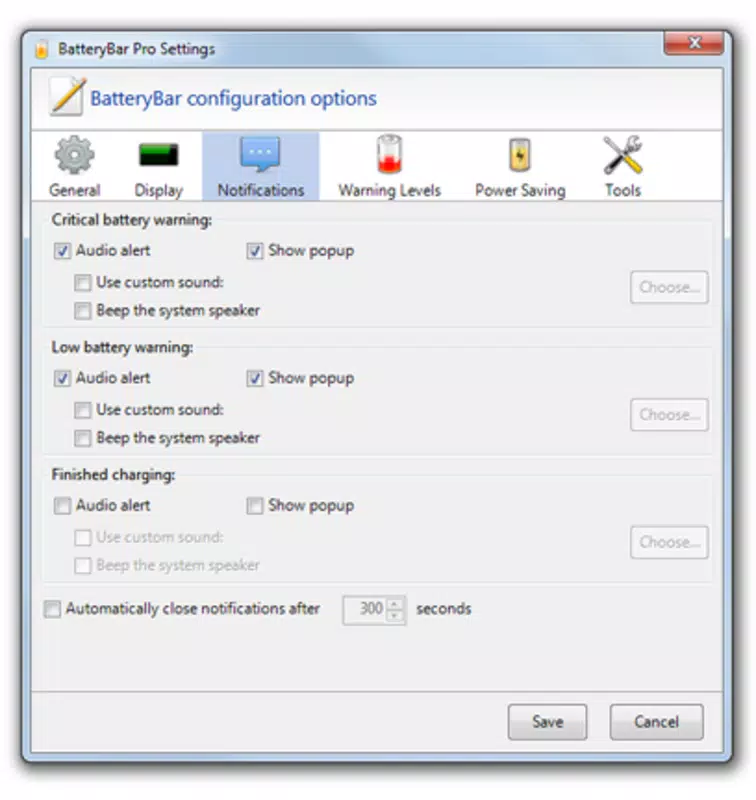
- No advanced customization options for battery alerts or notifications
- Only available for Windows, limiting cross-platform access
- Specific performance benchmarks or usage statistics were not disclosed
- Minimal feature set may not appeal to power users seeking deeper analytics


